> ## Documentation Index
> Fetch the complete documentation index at: https://omniloy.mintlify.site/llms.txt
> Use this file to discover all available pages before exploring further.
# SofIA: Medical Copilot
> Integrate clinical AI transcription and structured report generation into your healthcare application
SofIA provides AI-powered clinical documentation tools. The SDK captures medical conversations via voice, generates structured clinical reports from JSON Schema templates, and delivers them to your EHR/HIS. The API (Codify) provides ICD-10/SNOMED coding for clinical text.
See SofIA SDK in action: [Integration examples](/sofia/en/showcase/examples)
Embed a web component for real-time clinical transcription and report generation during consultations.
REST API for batch ICD-10/SNOMED coding, clinical data extraction, and automated workflows.
## What you can build
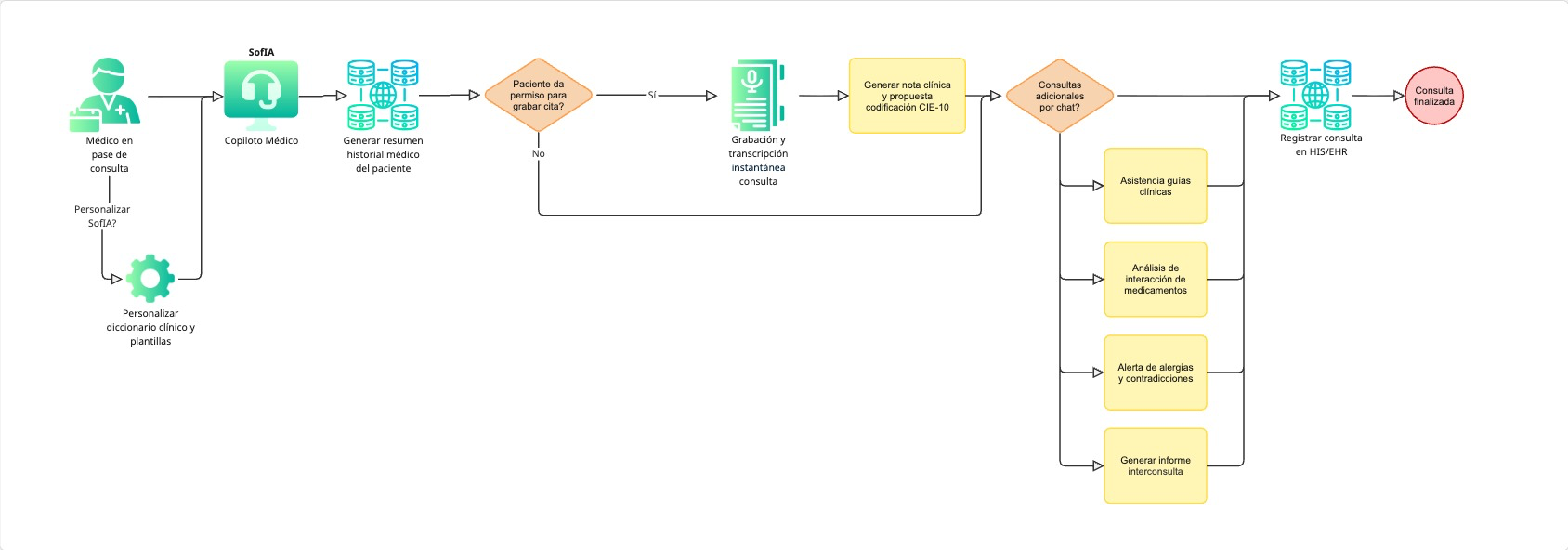 * **Real-time transcription** -- capture doctor-patient conversations and convert them to structured clinical text with multilingual support (Spanish, Catalan, Basque, Galician, English)
* **Structured report generation** -- define JSON Schema templates (SOAP notes, discharge summaries, evolution notes) and receive filled reports via `handleReport` callback
* **Clinical actions (extras)** -- extract the actions that come out of a visit (petitions, appointments, tests, referrals) and deliver them per category via the `handleExtras` callback, [defined by your schema](/sofia/en/sdk/extras)
* **Clinical chat assistant** -- give physicians an AI-powered chat for quick clinical queries during consultations
* **Automated clinical coding** -- process clinical text through the Codify API to get ICD-10, SNOMED CT, and LOINC codes
* **EHR/HIS integration** -- receive structured data objects ready to insert into your hospital information system
## Get your credentials
**To get started**, email [support@omniloy.com](mailto:support@omniloy.com) with:
* Your **company name** and **project description**
* **Expected usage** (approximate number of consultations/month)
* Whether you need a **sandbox environment** for testing
The Omniloy team will provide your `apikey`. For newer keys the SDK auto-selects the endpoint — no `baseurl` needed; other keys also come with a `baseurl` to configure. Omniloy tells you which applies to yours.
## Next steps
Get a working SofIA integration in 5 minutes.
npm, CDN, and framework-specific setup instructions.
Understand how the cognitive framework, transcriber, and agents work together.
Functional implementations in Vanilla TS, Angular, and AngularJS.
* **Real-time transcription** -- capture doctor-patient conversations and convert them to structured clinical text with multilingual support (Spanish, Catalan, Basque, Galician, English)
* **Structured report generation** -- define JSON Schema templates (SOAP notes, discharge summaries, evolution notes) and receive filled reports via `handleReport` callback
* **Clinical actions (extras)** -- extract the actions that come out of a visit (petitions, appointments, tests, referrals) and deliver them per category via the `handleExtras` callback, [defined by your schema](/sofia/en/sdk/extras)
* **Clinical chat assistant** -- give physicians an AI-powered chat for quick clinical queries during consultations
* **Automated clinical coding** -- process clinical text through the Codify API to get ICD-10, SNOMED CT, and LOINC codes
* **EHR/HIS integration** -- receive structured data objects ready to insert into your hospital information system
## Get your credentials
**To get started**, email [support@omniloy.com](mailto:support@omniloy.com) with:
* Your **company name** and **project description**
* **Expected usage** (approximate number of consultations/month)
* Whether you need a **sandbox environment** for testing
The Omniloy team will provide your `apikey`. For newer keys the SDK auto-selects the endpoint — no `baseurl` needed; other keys also come with a `baseurl` to configure. Omniloy tells you which applies to yours.
## Next steps
Get a working SofIA integration in 5 minutes.
npm, CDN, and framework-specific setup instructions.
Understand how the cognitive framework, transcriber, and agents work together.
Functional implementations in Vanilla TS, Angular, and AngularJS.